

LALAL.AI Alternatives: 4 Ways to Split Vocals and Stems, Free and Paid

Published: · Updated:
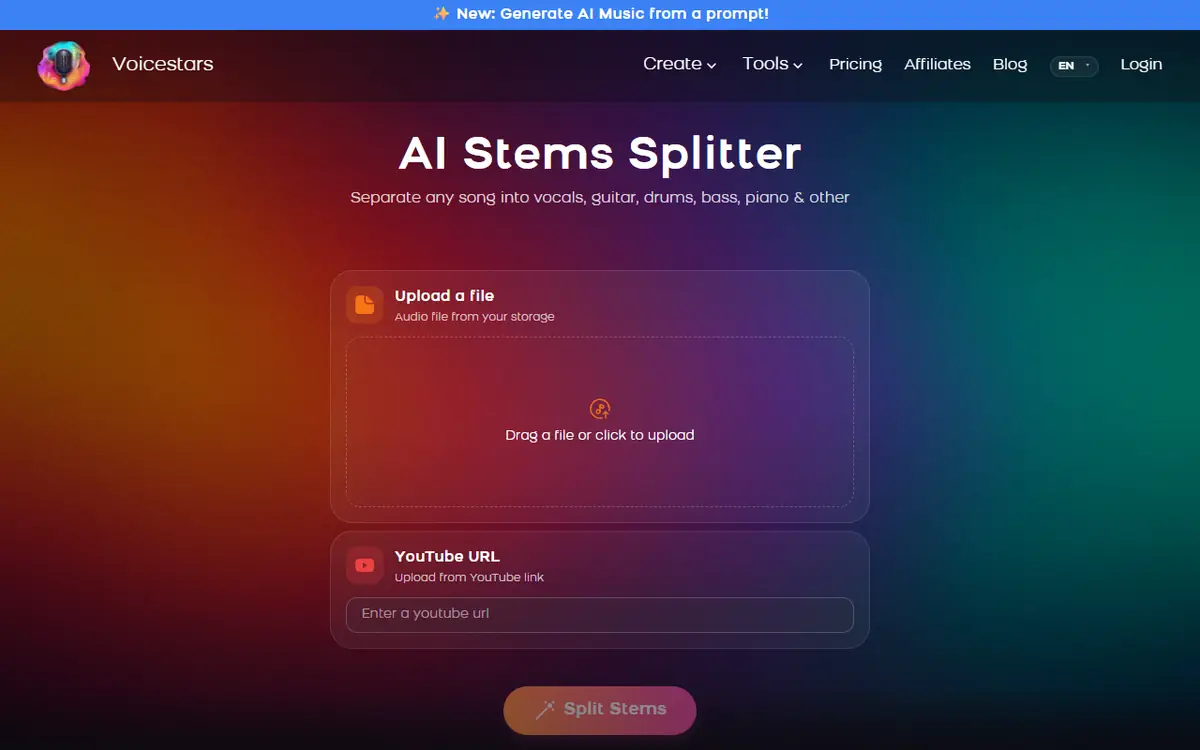
Want to test an alternative right away? The Voicestars AI Stems Splitter separates vocals, drums, bass, guitar, piano and other parts online.
LALAL.AI is a popular online tool for separating vocals and instruments, but its free plan is small and many users look for alternatives that are cheaper, free or run offline.
This guide compares four LALAL.AI alternatives, from an online splitter to free open-source desktop tools, and gives five steps to get cleaner stems whichever tool you choose.
We reviewed the LALAL.AI and Voicestars pricing pages and the open-source projects on 11 November 2026. We did not run a separation quality test.
Quick answer
The main LALAL.AI alternatives are the Voicestars Stems Splitter (online, credit-based), Ultimate Vocal Remover (free desktop app), Demucs (free open-source model, repository archived by Meta in 2025) and Audacity’s Vocal Reduction and Isolation effect (free, not AI). Pick online for convenience, desktop for many songs or offline work, start from a high-quality file and compare stems soloed before exporting.
- 01 Source Best-quality file you have
- 02 Split Only the stems you need
- 03 Check Solo for bleed, then export
Original editorial workflow diagram; not a product screenshot or test result.
Online, desktop or editor effect?
The table compares access and cost on the verification date. It is not a quality ranking.
| Tool | Type | Cost model | Good to know |
|---|---|---|---|
| LALAL.AI | Online and apps | Free Starter (10 min, Relaxed Queue), then Lite or Pro plans | Starter is for testing; result downloads are listed on paid plans. |
| Voicestars Stems Splitter | Online | Shared credits: 17 credits per minute on the pricing page | Splits vocals, drums, bass, guitar, piano and other; same credits as AI covers. |
| Ultimate Vocal Remover (UVR) | Free desktop app | Free, open source | Runs on your computer; faster with a capable GPU. |
| Demucs | Open-source model (command line) | Free | Meta archived the repository in January 2025; still usable but not maintained there. |
| Audacity Vocal Reduction and Isolation | Free audio editor effect | Free | Not AI separation; works best on centre-panned vocals. |
On the Voicestars pricing page, the Basic plan’s 1,250 credits correspond to about 73 minutes of stem splitting at 17 credits per minute.

Sources: LALAL.AI pricing page · Voicestars pricing · Ultimate Vocal Remover (GitHub)
Get clean stems with any LALAL.AI alternative in 5 steps
The steps apply to online and desktop splitters alike.
- Choose by how often and where you work. For occasional online splits, use a web splitter; for many songs or offline work, install a free desktop tool such as UVR.
- Start from the best source you have: a lossless or high-bitrate file, not a compressed video rip. Artefacts in the source become artefacts in every stem.
- Pick only the stems you need. Vocals and instrumental are fastest; four- or six-stem splits take longer and, on minute-based plans, can cost more.
- Listen to the stems soloed and together. Check for “bleed” (drums in the vocal, reverb tails cut off). If one tool leaves bleed, try another model on the same song.
- Export and keep rights in mind. Stems of commercial songs are fine for practice and private remixes; publishing a cover or remix needs the right licences.
Example: a stem checklist before a remix
An original checklist for judging separated stems.
Vocal: no hi-hat ticks, no guitar strums, breaths intact
Drums: kick and snare punchy, no vocal ghosts
Bass: steady low end, no kick doubling
Together: sums back close to the original
What to check
- Each stem is soloed at least once.
- Problem passages are noted with timestamps.
- The same song is tried in a second tool if bleed is heavy.
Why results differ between splitters
Most AI splitters use neural separation models trained to recognise vocals, drums, bass and other instruments. Different models handle reverb, distortion and dense mixes differently.
Open-source tools let you choose and combine models, which is powerful but technical. Online tools pick a model for you and handle the processing.
Audacity’s Vocal Reduction and Isolation is a classic effect based on stereo placement, not a trained model, so it struggles when vocals are not centred.
For a deeper look at how separation works and how to judge stems, read our AI stem splitter guide.
Fix common stem separation problems
| Symptom | Likely cause | What to do |
|---|---|---|
| Drums audible in the vocal | Model bleed | Try another model or tool on the same song. |
| Watery, phasey vocal | Low-quality source file | Use a lossless or higher-bitrate file. |
| Vocal reverb cut off | Reverb treated as instrumental | Accept it or add reverb back later. |
| Desktop tool very slow | No GPU acceleration | Use a lighter model or an online splitter. |
Split stems with Voicestars
Upload a file or paste a YouTube link, then download the stems you need.
- Open the AI Stems Splitter and upload your song.
- Choose the stems to separate.
- Download the stems, or use the vocal to make an AI cover.
Got a clean acapella? Turn it into a cover with our AI song cover guide.
What this guide does and does not establish
Prices and limits are from pricing pages on the verification date and can change.
We did not compare separation quality, speed or GPU requirements.
Evidence, method and responsibility
Research and interface checks: 11 November 2026. Maintained by Voicestars Editorial under the Nolan Vale pen name. This role is not a claim of an independent qualification or an endorsement by the cited organizations.
- LALAL.AI and Voicestars pricing pages, the Ultimate Vocal Remover and Demucs repositories and the Audacity manual reviewed 11 November 2026; screenshots captured that day.
- Keyword research: DataForSEO Google keyword suggestions, United States, English, collected 11 November 2026 (lalal ai alternative, lalal ai alternative free, alternative to lalal ai; low reported volumes).
- The checklist is original. No separation test is reported.
- Voicestars publishes this guide and sells the stem splitter mentioned; it has a commercial interest in this comparison.
We distinguish provider documentation, observed interface behavior and proposed exercises. Screenshots are our actual browser captures; a screenshot of a form does not prove audio quality. No invented measurements, reviewer credentials or user ratings are used.
Report a correction to Voicestars Editorial with the page, date, a short reproducible example and the observed result. Avoid sending private recordings. See our editorial policy.
Frequently asked questions
What is the best free LALAL.AI alternative?
Ultimate Vocal Remover is a free, open-source desktop app that runs separation models on your computer. Audacity’s Vocal Reduction and Isolation effect is free too, but it is not AI separation.
Is LALAL.AI free?
Its pricing page lists a free Starter plan with 10 minutes in the Relaxed Queue and a 200 MB file limit, mainly for testing. Paid Lite and Pro plans add Fast Queue minutes and downloads.
How much does LALAL.AI cost?
On the verification date, Lite was listed at $7.50 per month billed $90 a year, and Pro at $15 per month billed $180 a year. Check the pricing page for current offers.
Which is better, LALAL.AI or a free desktop tool?
Online tools are easier and need no powerful computer. Desktop tools are free per song but need setup and processing power. Test both on the same song.
Is Demucs still available?
Yes, the code remains public, but Meta archived its GitHub repository on 1 January 2025, so it is read-only there. Many apps still use Demucs-based models.
Can I get a clean acapella from any song?
Not always. Heavy reverb, distortion or vocals mixed into instruments leave bleed. A better source file and a different model often help.
Sources and verification date
Consulted 11 November 2026. Provider features, plans and laws can change. Product documentation is distinguished from the original exercises proposed in this guide.
For free desktop separation, see Ultimate Vocal Remover on GitHub; for the non-AI method, the Audacity Vocal Reduction and Isolation manual.


