

Uberduck AI: What It Does Now and How to Use It in 5 Steps

Published: · Updated:
If what you really want is a complete track rather than a single voice line, the Voicestars AI song generator creates a song with vocals from a prompt or your own lyrics.
Uberduck became famous for its huge library of character and celebrity voices. Today the platform presents itself differently: AI vocals, rap, voice cloning, speech-to-speech and AI music, with an API for developers.
This guide summarises what Uberduck offers now, what its plans include, what happened to the voices many people remember and how to use it in five steps.
We reviewed Uberduck’s homepage and pricing page on 10 November 2026. We did not buy a plan or rank its audio quality.
Convert your vocal with an AI voice
Pick a voice, drop your recording or switch to text, then continue on the voice page.
Quick answer
Uberduck AI is a platform for generating speech, singing and rap from text, creating custom voices, converting voices and making AI music with lyrics, with an API. It has a free starting point and paid plans from $2 per month billed yearly; commercial use requires an upgrade. To use it, choose the output, check your plan, write the text or lyrics, pick or create a consented voice, then generate, review and export.
- 01 Output Speech, rap, singing, conversion or song
- 02 Plan Commercial licence before monetised work
- 03 Voice Library voice or consented custom voice
Original editorial workflow diagram; not a product screenshot or test result.
Uberduck plans and features in 2026
Prices and inclusions as shown on Uberduck’s pricing page with yearly billing. Monthly billing may cost more.
| Plan | Price shown | Licence | Notable inclusions |
|---|---|---|---|
| Free | $0 | Not stated for free use | Entry access; upgrade needed for commercial use |
| Starter | $2.00 / month, paid yearly | Non-commercial | Private voice access, 1,000 monthly credits |
| Creator | $5.00 / month, paid yearly | Commercial | Private voices, API access, AI-generated raps, 3,600 monthly credits |
| Pro | $30.00 / month, paid yearly | Commercial | For larger creators and businesses; higher limits |
Plan details change; check the pricing page on the day you subscribe.
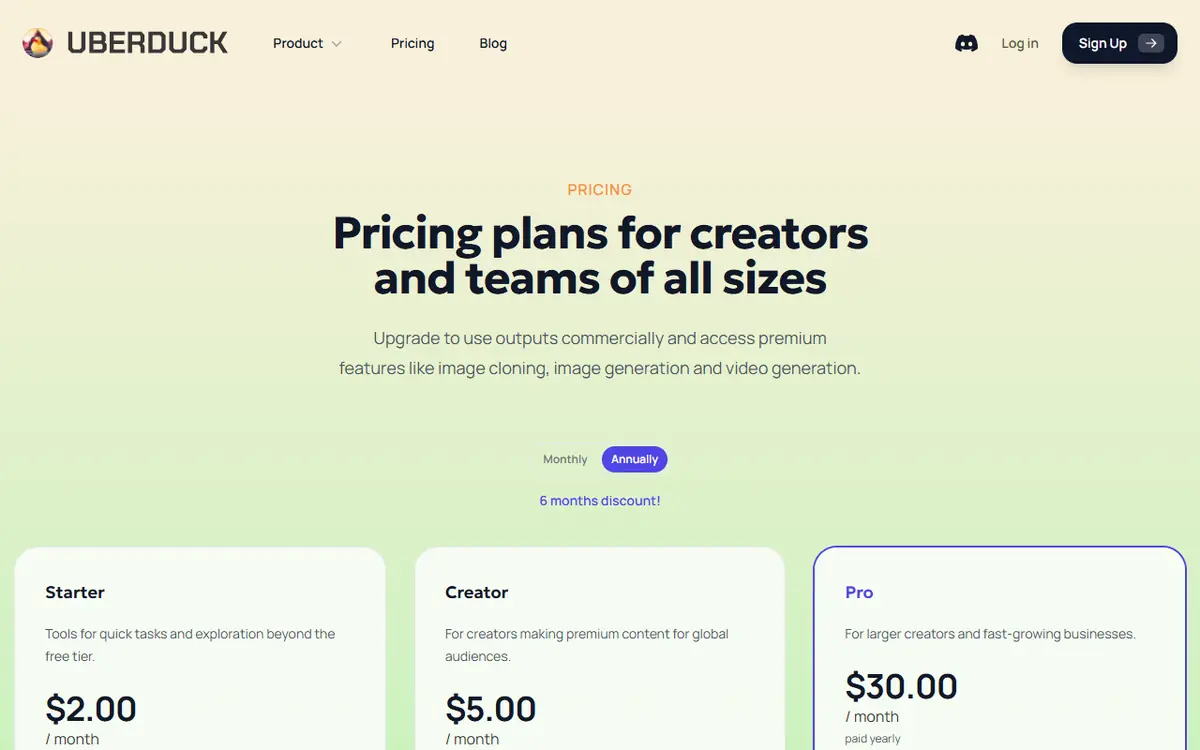
Sources: Uberduck pricing · Uberduck official site
Use Uberduck in 5 steps
Follow the same order for speech, rap or songs; only the input changes.
- Decide what you need from Uberduck: spoken text to speech, a rapped or sung line, a voice clone, speech-to-speech conversion or a full AI song. The output decides which tool inside Uberduck you open.
- Create an account and check the plan you are on. The pricing page states that you need to upgrade to use outputs commercially, so pick a commercial plan before working on anything you will monetise.
- Write the text or lyrics. For rap and singing, mark syllables and line breaks so the timing is predictable; for speech, write numbers and abbreviations as they should be read.
- Choose a voice, or create a custom voice only from recordings of someone who has agreed. Audition two or three voices on the same line before generating long content.
- Generate, review and export. Listen for mispronunciations and timing problems, regenerate only the weak parts, then download and keep a note of the plan and licence that applied to that output.
Example: lyrics marked for an AI rap line
This original two-bar example uses slashes for beats and capitals for stressed syllables, which helps any text-to-rap tool keep the flow.
I GOT the BEAT on / LOOP in the DARK /
WROTE it at MIDnight / NOW it's a SPARK /
What to check
- Each bar has a similar number of syllables.
- Stressed syllables land where the beat hits.
- Line endings rhyme clearly when spoken.
What happened to the old Uberduck voices?
Many users searching for Uberduck remember typing a line and hearing it in a cartoon or celebrity voice. Searches such as “uberduck removed voices” show that this change is still noticed.
Third-party reviews report that celebrity voice clones were removed after licensing disputes. Uberduck’s current homepage does not mention celebrity voices; it focuses on generated vocals, custom voices and AI music, with a statement that AI music can be used commercially on any paid plan.
If you relied on a specific old voice, the realistic options are a similar library voice, a custom voice created with the speaker’s consent, or a different workflow such as converting your own performance.
For rap specifically, our AI rapper guide compares generating a song with converting your own verse.
Fix common Uberduck problems
| Symptom | Likely cause | What to do |
|---|---|---|
| Old favourite voice missing | Voice library changed | Look for a similar voice or create a consented custom voice. |
| Rap falls off the beat | Lyrics not marked for timing | Shorten lines and mark syllables before generating. |
| Cannot use output commercially | Non-commercial plan | Upgrade to a plan with a commercial licence first. |
| Name read incorrectly | Unusual spelling | Spell it phonetically in the text. |
Need a full song instead of a voice line?
If your goal is a complete track with vocals and instruments, a song generator is the more direct route.
- Describe the song: genre, mood, topic and language, or paste your lyrics.
- Generate and compare the two versions.
- Download the full mix or separate vocals and instrumental for editing.
Comparing several music tools? See our AI music generator comparison.
What this guide does and does not establish
Plan information comes from Uberduck’s pricing page with yearly billing on 10 November 2026; we did not purchase a plan or test credits.
Statements about removed voices come from third-party reviews and are reported as such.
Evidence, method and responsibility
Research and interface checks: 10 November 2026. Maintained by Voicestars Editorial under the Nolan Vale pen name. This role is not a claim of an independent qualification or an endorsement by the cited organizations.
- Uberduck homepage and pricing page reviewed 10 November 2026; third-party reviews used only for the history of removed voices.
- Keyword research: DataForSEO Google keyword suggestions, United States, English, collected 10 November 2026 (uberduck, uberduck ai, uberduck ai voice, uberduck voice cloning, uberduck removed voices, uberduck alternative).
- The lyric example is original. No generated audio is presented as a test.
- Voicestars publishes this guide and offers an AI song generator mentioned as an alternative workflow.
We distinguish provider documentation, observed interface behavior and proposed exercises. Screenshots are our actual browser captures; a screenshot of a form does not prove audio quality. No invented measurements, reviewer credentials or user ratings are used.
Report a correction to Voicestars Editorial with the page, date, a short reproducible example and the observed result. Avoid sending private recordings. See our editorial policy.
Frequently asked questions
What is Uberduck AI now?
Uberduck’s homepage describes tools to generate speech, singing and rapping from text, make custom voices, convert one voice into another, create AI music with lyrics in 70+ languages, and use these features through an API.
Is Uberduck free?
Uberduck has a free starting point, and its pricing page lists paid plans from $2 per month billed yearly. Commercial use requires an upgrade.
Why were Uberduck voices removed?
Long-time users remember a large library of character and celebrity voices. Third-party reviews say many were removed after licensing disputes; we found no official Uberduck statement and its homepage does not mention celebrity voices.
Can Uberduck make AI rap?
Yes. Uberduck advertises rapping from text, and its Creator plan lists AI-generated raps among its inclusions.
Does Uberduck have an API?
Yes. The homepage describes API access for text to speech, singing, rapping and voice conversion, and the pricing page lists API access on the Creator plan.
What is a good Uberduck alternative?
Choose by output: a text-to-speech service for narration, a voice-conversion catalogue for covers, or an AI song generator for complete tracks with vocals.
Sources and verification date
Consulted 10 November 2026. Provider features, plans and laws can change. Product documentation is distinguished from the original exercises proposed in this guide.
Check the current features on the Uberduck homepage and the licence attached to each plan on Uberduck’s pricing page before publishing anything.


