

Celebrity Voice Generator: How to Use One Responsibly in 6 Steps
Published: · Updated:
To hear what voice conversion sounds like before you record anything, browse the Voicestars celebrity AI voices and audition their demos.
AI celebrity voice generators can make a famous-sounding voice read a line or sing a cover in seconds. The quality depends on the type of generator and your input; the risk depends on how you use the result.
This guide explains the difference between text-to-speech and voice-conversion generators, then gives six steps to make a clip that sounds right and stays clearly labelled and fair to the person imitated.
We reviewed the Voicestars celebrity category and current public information on voice likeness laws. Nothing here is legal advice.
Convert your voice into a celebrity voice
Drop a clean recording, or switch to text, then continue on the voice page.
Quick answer
A celebrity voice generator produces audio in a voice modelled on a famous person. Use text to speech for short spoken lines and voice conversion for singing or expressive delivery. Start from a clean, dry recording, choose a voice in your range, review the output line by line, then label it as AI and avoid adverts, endorsements or anything that could pass as a real statement.
- 01 Purpose Parody, private fun or demo; no endorsements
- 02 Create Clean input, matching voice, careful review
- 03 Publish Label as AI, remove on request
Original editorial workflow diagram; not a product screenshot or test result.
Text to speech, voice conversion or original vocals?
The table compares generator types by what you provide and what you get. It is not a ranking of tools.
| Type | You provide | Strength | Limitation |
|---|---|---|---|
| Text to speech | Typed text | Fast for short spoken lines | Intonation and emotion depend on the model; singing is limited. |
| Voice conversion | A recorded spoken or sung vocal (or typed text on some voice pages) | Keeps your timing, melody and emotion | Needs a clean recording and a voice in a similar range. |
| Song generation (not imitation) | A prompt or lyrics | Original vocals without copying a real person | Does not sound like a specific celebrity, by design. |
If you need a famous-sounding vocal for anything commercial, an original AI vocal or a licensed voice is the safer option.
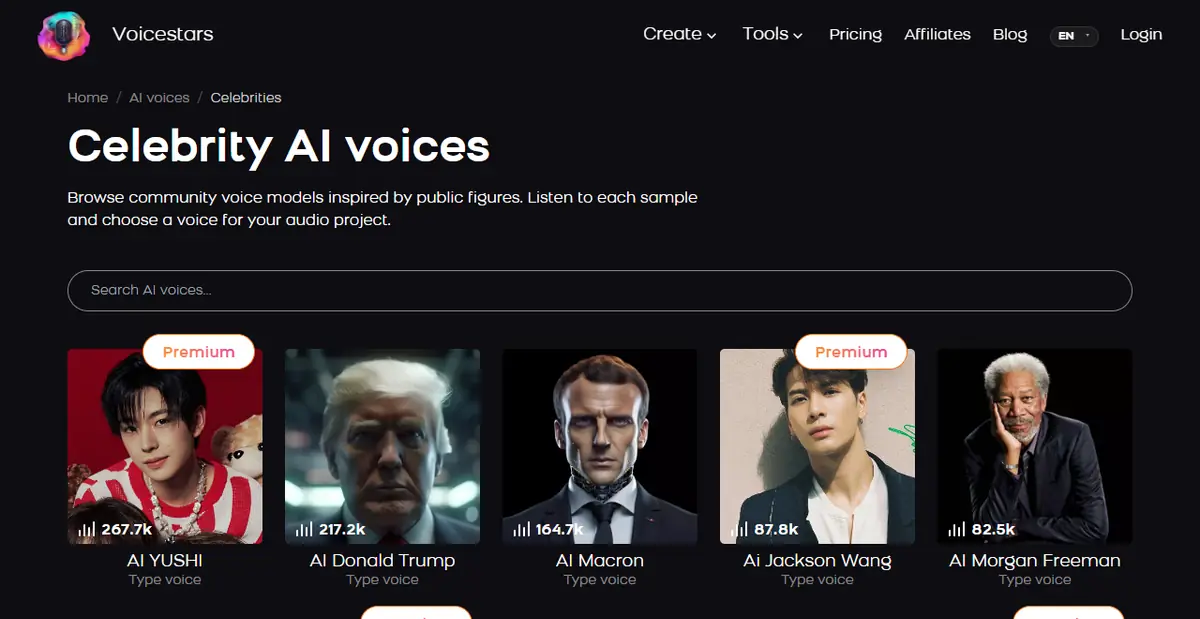
Sources: Voicestars celebrity AI voices · Voicestars stem splitter
Use a celebrity voice generator in 6 steps
Steps 1 and 6 matter as much as the technical steps in between.
- Define the purpose before choosing a voice: a private joke, an obvious parody, a cover for personal use or a demo. Avoid adverts, endorsements, political messages and anything that could be mistaken for a real statement.
- Choose the generator type. Use text to speech for a short spoken line, and voice conversion when timing, emotion or singing must sound natural.
- Prepare clean input. For conversion, record a dry vocal close to the mic, or separate the vocal from a song you are allowed to use with a stem splitter. Background music and reverb in the input become artefacts in the output.
- Pick a voice whose range matches yours and audition its demo. A singer with a very different register will crack or sound strained when converting your performance.
- Convert or generate, then review the result line by line: mispronounced words, metallic syllables, breaths turned into noise. Fix the input and regenerate rather than over-processing the output.
- Label the clip as AI-generated and keep it in context. Do not imply the celebrity said or endorsed it, remove it if the person or their representatives object, and get permission before any commercial use.
Example: a parody label that leaves no doubt
Use an original caption like this when you post an AI celebrity clip, so nobody mistakes it for a real statement.
AI voice parody: this audio was created with an AI voice model and was not recorded or approved by [name]. For entertainment only.What to check
- The label appears in the video or post itself, not only in the comments.
- The content is not an advert or endorsement.
- The clip makes sense as a joke or demo, not as news.
Voice likeness laws in 2026
Tennessee’s ELVIS Act (Ensuring Likeness Voice and Image Security Act), signed on 21 March 2024 and effective on 1 July 2024, added voice, including simulated voices, to the personal rights the state protects against unauthorised use.
At federal level, the NO FAKES Act, which would create a right against unauthorised digital replicas of a person’s voice or likeness, was reintroduced in Congress in May 2026. When we checked, it had not been enacted.
Rules differ by country and platform, and they are changing quickly. The practical standard is consistent: be transparent that a voice is synthetic, do not deceive, and get permission for commercial use.
For singing, start by isolating a clean vocal; our AI stem splitter guide explains how to check what you extract.
Fix common celebrity voice problems
| Symptom | Likely cause | What to do |
|---|---|---|
| Voice sounds metallic | Reverb or music in the input | Record dry or separate the vocal first. |
| Cracks on high notes | Range mismatch | Pick a voice closer to your register or transpose. |
| Words unclear | Mumbled input performance | Re-record with clearer consonants. |
| Sounds like you, not the celebrity | Weak conversion or wrong model | Try another model of the same voice. |
Make a celebrity-style cover with Voicestars
Each Voicestars voice page accepts an uploaded file, an AI-generated song, typed text or a microphone recording, then converts it into the chosen voice.
- Separate or record a clean vocal you are allowed to use.
- Browse the celebrity category and audition voices in your range.
- Convert, compare with the original and label the result as AI.
Need the acapella first? Use the Voicestars stem splitter on a song you are allowed to use.
What this guide does and does not establish
Legal information is a dated summary of public sources, not advice for your situation.
We did not measure conversion quality across voices or test third-party celebrity generators.
Evidence, method and responsibility
Research and interface checks: 10 November 2026. Maintained by Voicestars Editorial under the Nolan Vale pen name. This role is not a claim of an independent qualification or an endorsement by the cited organizations.
- Voicestars celebrity category, the Tennessee ELVIS Act announcement and reporting on the 2026 NO FAKES Act reviewed 10 November 2026.
- Keyword research: DataForSEO Google keyword suggestions, United States, English, collected 10 November 2026 (ai celebrity voice generator, celebrity voice generator, celebrity ai voice generator, ai voice generator celebrity, free variants).
- The parody label is an original example. No generated audio is presented as a test.
- Voicestars publishes this guide and offers the celebrity AI voices mentioned; it has a commercial interest in this topic.
We distinguish provider documentation, observed interface behavior and proposed exercises. Screenshots are our actual browser captures; a screenshot of a form does not prove audio quality. No invented measurements, reviewer credentials or user ratings are used.
Report a correction to Voicestars Editorial with the page, date, a short reproducible example and the observed result. Avoid sending private recordings. See our editorial policy.
Frequently asked questions
What is a celebrity voice generator?
It is an AI tool that produces audio in a voice modelled on a famous person, either from typed text (text to speech) or by converting a recorded performance (voice conversion).
Is it legal to use an AI celebrity voice?
It depends on the place and the use. Tennessee’s ELVIS Act, signed on 21 March 2024, protects a person’s voice against unauthorised use, and a federal NO FAKES Act has been proposed in the US. Private, clearly labelled parody is lower risk than commercial use. This is not legal advice.
Is there a free AI celebrity voice generator?
Many tools offer free credits or trials. Free tiers change often, so check limits, watermarks and usage terms before starting a project.
Can a celebrity voice generator sing?
Voice conversion can, because it keeps the melody of the vocal you provide. Text-to-speech voices are mainly designed for speech.
Why does the AI celebrity voice sound robotic?
The usual causes are a noisy or reverberant input, a performance far outside the voice’s range, or a weak model. Record cleaner input and try a voice closer to your register.
Can I monetise videos that use celebrity AI voices?
Platforms and laws increasingly restrict misleading synthetic media. Without permission from the person, avoid monetised or commercial use.
Sources and verification date
Consulted 10 November 2026. Provider features, plans and laws can change. Product documentation is distinguished from the original exercises proposed in this guide.
For the law that first named AI voice cloning explicitly, see the Tennessee announcement of the ELVIS Act, and for the proposed federal rules, Manatt’s summary of the 2026 NO FAKES Act.


